Vibe Code
Your Real Work
How building small tools for your everyday tasks frees up time and energy — while raising both the quantity and quality of your output.
You're Already Vibe Coding
Now Point It at Your Real Work
You're vibe coding. Maybe you've picked your stack. Maybe you've set up an AI-powered workflow. Maybe you're just getting started. Either way — you know what it feels like to talk to an AI and watch things change in front of your eyes.
This week isn't about building for customers. It's about pointing that same power at the work behind the product — the setup, the operations, the stuff you and your team grind through every week.
Not a pivot. An addition. And once you see how insanely practical it is, you'll wonder why you didn't start here.
How this started for me:
It started with the CaptAIn. AI models were getting better fast, and every time a better model came out, I had to re-explain all my context. So I built a tool to maintain that context across model switches. As an exercise, I turned it into a SaaS — but it started as solving my own problem. Then I realized my codebase looked better than my WordPress site. "I can just talk to my website." Voice to Cursor to website changes in real time. I kicked WordPress, moved everything into the same codebase, and pirateskills.com was born. No more plugins. No more static limitations. Dynamic experiences — voting inside articles, interactive tools, things WordPress couldn't do.
Those were products. The CaptAIn. The website. But the moment that really changed how I think about vibe coding was smaller and more mundane.
Christina is responsible for our events. Back then, that meant entering them into Google Calendar, creating Zoom meetings with the right settings, copying links back and forth, adding descriptions. They didn't show up in the database. Nothing was connected.
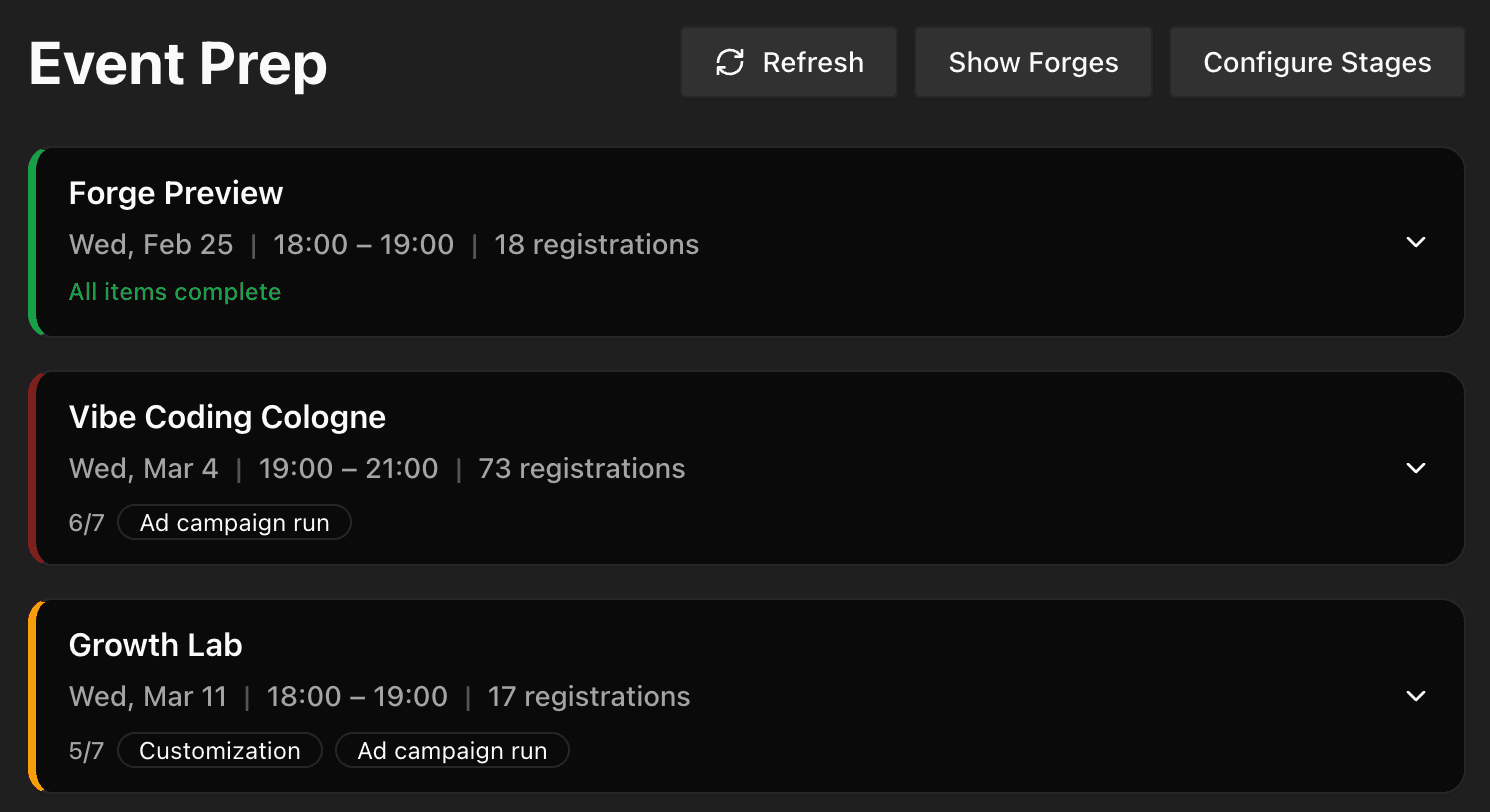
So I built an Event Prep page. A simple dashboard showing which events were up-to-date: in the database, customized, GCal event attached, Zoom link set. The dashboard showed a wall of missing items.
"I still have to plan 84 events. Why can't my AI code editor do this for me?"
Have you ever built a tool just for yourself or your own workflow?
Why Helper Tools Are
Insanely Practical
This isn't "more important than products." It's just insanely practical. Five reasons:
Zero acquisition cost. You're the user. No marketing, no onboarding, no churn. You built it for yourself and you're going to use it.
Instant feedback. You know immediately if it works. No user interviews needed. No guessing about product-market fit. You are the market.
Daily compounding. Every use saves time AND reveals improvements. A product for customers needs external feedback loops. A tool for yourself improves every time you open it.
Perfect fit. You know the problem because you live it. No requirements gathering. No stakeholder alignment. The spec is your frustration.
No scope creep. Build only what you need. Nobody's requesting features. Nobody's filing bug reports. You ship what serves you and stop.
And here's the counter-intuitive truth: building the event tool + doing all 84 events took less time than just doing the events the old way. The tool isn't a detour. It's a shortcut.
From "84 Events to Plan"
to Half a Day
Here's what event management used to look like.
Before: Christina's Process
Decide on dates — prefers Wednesday afternoons, working around holidays and vacations.
Create Google Calendar events — just a title, no details.
Go to Zoom, create a meeting with all the correct settings.
Copy the Zoom link back into the Google Calendar event.
Add descriptions to each calendar event.
Sometimes manually import website registrations into GCal.
Regular, time-consuming, taking significant time from both our schedules.
After: With the Tooling
I gave the AI access to Google Calendar and Zoom — just a couple of API keys and settings. No MCP server needed. Just functions the AI wrote. Same magic as talking to the website: now I could "talk to" my calendar and Zoom account.
84 events. 7 different types. Half a day.
The Event Prep Dashboard shows exactly what's missing in the next 4-6 events. GCal events are already set up with custom descriptions per event type. Registrations between website and GCal are in sync. Zoom links are already added.
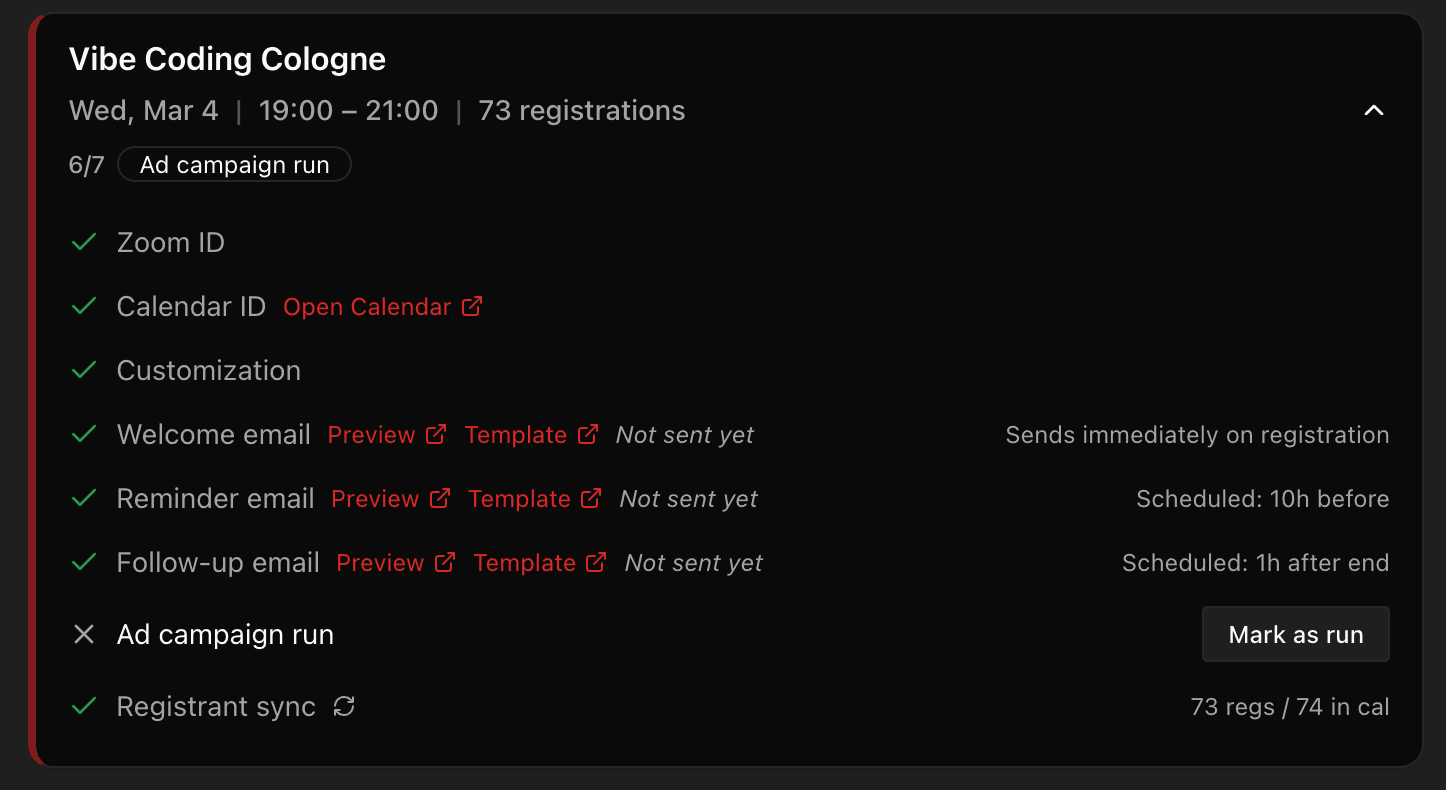
Things we used to gloss over — good descriptions, customized titles, reminder emails — are now fully managed. The quality went up because the machine doesn't get tired at event #60.
Future quarters: roughly one hour.
What surprised me most:
How easy it was to give AI access to these tools. Everyone touts MCP as the default way. But for Google Calendar and Zoom, it was just functions the AI wrote — and when something needs changing, it just calls those functions. Simple. And the biggest surprise: I could add things to all 84 events that I'd never bother doing manually. Good descriptions. Customized titles. The quality went up because the machine doesn't get lazy about the 60th event.
How to Pick the Right Problem
(and What NOT to Build)
Not every repetitive task deserves a tool. The framework is three questions:
What task do you repeat regularly that makes you groan? Not "occasionally annoying." Regularly. The groan is the signal.
What data do you check in 3+ places that could be in one view? Context-switching kills time silently. If you're opening Google Calendar, then Zoom, then your database, then your website — that's a dashboard waiting to happen.
What process has steps you always forget? If there's a checklist you should follow but don't, a tool that shows you the missing steps is worth more than willpower.
Selection criteria: frequent, annoying, buildable in one session.
What NOT to Build
I built a to-do list inside Pirate Skills that I could manage through the CaptAIn. Abandoned it. Linear is a much more robust PM system — cheap, purpose-built, better in every way.
I considered building analytics dashboards in my admin area. Pulled away. PostHog is just so much better at it.
The rule: build where you can't get easy, simple, reliable access to an existing tool. If a great tool exists for $20/month, use it. Build for the gaps.
12 Ideas to Get You Started
Build
Event Prep dashboard
See what's missing across all upcoming events
Content tracker
From idea to published, one view per piece
Attendee feedback board
Pull ratings and comments into one place
Feature usage heatmap
Which tools your users actually open
Grow
Ad creative drafter
Generate variations from your positioning
Social cascade planner
One article turns into LinkedIn, Instagram, newsletter
Funnel drop-off alerter
Daily ping if conversion drops below threshold
SEO content brief generator
From keyword to outline in one prompt
Automate
Calendar + Zoom batch setup
84 events, half a day
Email sequence builder
Welcome, reminder, follow-up per event type
Registrant sync
Website signups auto-added to calendar invites
Invoice matcher
Stripe transactions mapped to your accounting
From Friction to Functional
Four Levels
Not every tool requires code. That's the first thing founders get wrong. There's a progression — and you should always start at the top.
Search first. Before you build anything, check if someone already solved it. Browse MCP server directories, skill directories like skills.sh, or your AI editor's extension ecosystem. A Stripe MCP server? Already exists. A Linear integration? Already exists. Five minutes of searching can save you a full build session.
Write a skill, not code. A skill is just a set of instructions your AI follows — a process it knows by heart. No code required. I have a skill that plans our entire weekly content cycle: it reads the planning doc, checks what's done, and tells me the next step. Another one sets up Google Calendar events with the right descriptions per event type. They're just markdown files that describe a process — and the AI executes it perfectly every time.
Give the AI functions to call. Code becomes necessary when the AI needs to call APIs repeatedly — creating 84 Zoom meetings, syncing registrants between your website and Google Calendar, sending batches of emails. That's when you write functions. Not a full app. Just the specific operations the AI needs, and it calls them as part of the skill. A couple of API keys, a few functions, and suddenly your AI can "talk to" your calendar and Zoom account the same way it talks to your codebase.
Build a dashboard when you need to see it. Some things are better as a page you can open on Monday morning. The Event Prep dashboard started as "show me which events are missing what." That's when you write actual UI code — because a visual overview beats asking the AI the same question every week. Start read-only. Automate later.
The progression: search → skill → functions → dashboard. Most problems are solved before you ever write a line of code.
What I tell founders who push back:
"I don't trust the tool to be as good as me." — You're right to push back. The tool needs to be at least as good as you — until then, it's not ready. But it turns out the event tool was far better than me and Christina combined. Things we used to gloss over are now fully managed. And it only gets better. If I don't like something, I just say so, check the change, and move on.
When Your Tools Start
Building on Each Other
The compounding effect is the real story. Each tool made the next one faster.
Dashboard — see what's missing across all events.
Zoom service — automate meeting creation with correct settings per event type.
GCal service — automate calendar events with custom descriptions per type.
Setup scripts — batch operations across all events in a quarter.
Email workflows — zero-touch attendee journey from registration to follow-up.
Each tool was faster to build because the codebase already had the conventions. The AI remembered everything — the Zoom API patterns, the GCal date formatting, the database schema. It didn't need to relearn.
And the next evolution is always visible: one-click combo actions, auto-sync, ad automation. The codebase isn't just your product — it's your operating system.
Next on my list: an ad automation system. Draft creatives, set up campaigns, analyze daily which to scale up or shut down. Especially the creative generation and campaign setup — that's where the most time goes. The codebase already knows my positioning, my audience segments, my event calendar. The foundation is there.
Cheers,
Ben
Your First Helper Tool
in 7 Days
This is the smallest possible version of vibe coding that delivers real value. Not a product for customers. Not a demo. A real tool you'll open every week — built in one session, used on real work, compounding from day one.
By the end of this plan, you'll have one working helper tool and a clear before vs. after showing what changed.
Ready to Go Deeper?
Builder Lab
·Wed, Mar 18 · 18:00 CETFree weekly online session where we work on real projects together. Bring what you're building and get live feedback.
Builder Forge
·In 32 days · Wed, Apr 16-week cohort program to build and ship your first product. Weekly workshops, accountability, and hands-on guidance.
Growth Lab
·Wed, Mar 11 · 18:00 CETFree weekly online session where we work on funnels and positioning together. Bring your challenges, get live feedback.
Growth Forge
·In 74 days · Wed, May 136-week cohort program to build predictable, scalable revenue. Weekly workshops, accountability, and hands-on guidance.
Questions & Answers

Founder from Cologne with 15 years of startup experience across 9 ventures. After helping thousands master growth marketing, Ben learned vibe coding from scratch and launched CaptAIn within three months. He leads the Vibe Coding Cologne community, blending real founder experience with teaching clarity.